Table of Contents
Table of Contents
- What information should a new landscaping client form collect?
- What personal details are essential in a new-client form?
- What property details should be captured in the form?
- What service preferences should be included in the form?
- How should contact and scheduling preferences be collected?
- What legal disclaimers or consent fields should be included?
- What questions help assess the client's landscaping budget?
- How do you ensure the form complies with data privacy regulations?
- What format is best for a new-client form (digital vs. paper)?
- How can you customize the free new landscaping client form template?
- How can Aspire help you streamline client onboarding and landscaping operations?
- Over to You!
Onboarding a new landscaping client is a crucial step in any business.
If it’s not done correctly, it can leave you with missed details, disorganized paperwork, and extra back-and-forth. This results in a negative client experience and a poor first impression.
A professional new-client form ensures that you gather all the necessary information, reducing onboarding time and creating a better customer experience. Still, this can be challenging if you don’t know where to start.
This is where a new landscaping client form template—like the one below—will be helpful.
This article covers all the various aspects you should include in your new landscaping client form and offers tips on data collection, legal disclaimers, questions, formatting, and more.
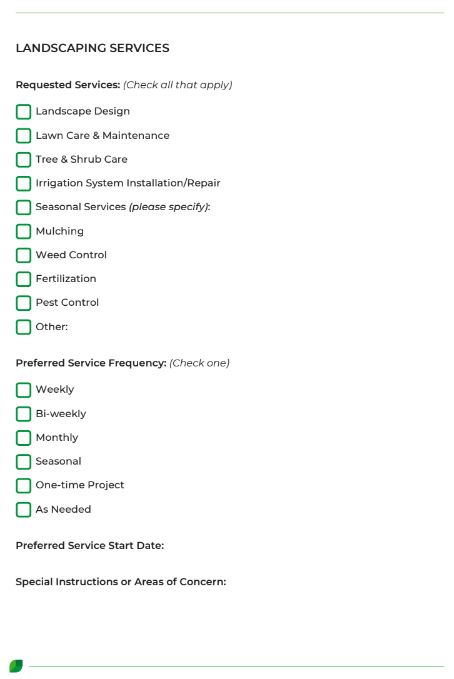
What information should a new landscaping client form collect?
The exact information you need to collect will vary depending on your business needs and the specific services you offer. However, some universal elements should be included on your new-client form.
Remember, your form serves as a foundation for client relationships, so it’s crucial to structure it well and make it easy to understand.
Include essential client, property, and service details
Your landscaping client form should act as a contact record and a project planning tool. You need to gather all the information you might require for future projects, such as:
Client information and contact details
Property owner details
Pets on the property
Lot size and type (residential, commercial, or HOA)
Preferred service days and times
Existing features (irrigation, hardscaping, drainage, slopes, etc.) and condition
Sunlight and shade patterns
Soil type
You should also include your service offering so clients can select the ones they are interested in, including:
Landscape design
Lawn care and maintenance
Tree and shrub care
Seasonal services (such as snow removal)
Irrigation system installation and maintenance
Make it easy to follow with clear sections
For your new landscaping client form to provide the most value, it needs to be comprehensive. However, an unstructured list of questions can be unpleasant and challenging to work through, and may even be a blocker for some clients.
To avoid this, you should group related questions into clear sections with headings. This could look like:
Client information
Property information
Landscaping services
Preferences
Legal
These categories will enable clients to complete the form more quickly and also make it easier to parse the information and find answers.
What personal details are essential in a new-client form?
The first section of your new landscaping client form should focus on gathering your client’s personal information. This includes:
Full name and preferred title: Asking your client what they prefer to be called enhances professionalism and personalization. Referring to your client as 'Mr. Smith' when he prefers 'John' can make him feel awkward. Asking for and sticking to their preference creates better customer relationships.
Phone number(s) and email address: Ideally, you should always gather more than one piece of contact information to separate communications and as a backup in case one fails. You can use the client’s mobile number for urgent updates and reminders, and the email address for invoicing.
Mailing address (if different from service address): Some clients prefer hard copies of their quotes and invoices, so collecting their mailing address is crucial. It’s also helpful for sending promotional mailers.
Emergency contact or alternate contact (optional): This is particularly important for commercial clients and those with rented properties.
What property details should be captured in the form?
Understanding the specifics of your client’s property is crucial for accurate quoting and appropriate project planning. Make sure you collect the following information:
Service address and property type: The type of property, whether it is a rental, HOA, owner-occupied, or commercial, affects scheduling and access requirements. For example, a commercial property may require security check-ins or after-hours access, while a rental property may require communication with both the tenant and the landlord.
Lot size and access info: The size of the lot will affect the scope of work, and access could limit the equipment you can use. For example, a narrow gate won’t accommodate a large lawnmower, so you would need to make other arrangements.
Existing landscaping features: Your team must be aware of features like sprinkler systems, patios, walkways, and fire pits to avoid potential damage. This is also crucial for planning landscaping projects to ensure cohesion with existing elements.
Pets: Clients with pets may need to keep their animals inside while you are on-site. Furthermore, some plants are toxic to household pets, so understanding which animals are on the property helps avoid accidental harm.
Upload field for photos or property diagrams (optional): If a client has a vision, they can share inspiration here. It is also an ideal place to submit photos of the current condition of the space.
What service preferences should be included in the form?
Adding a section to your new landscaping client form where customers can outline their service preferences helps your team understand their expectations from the start.
You should include:
Requested services: Create a checklist of all the services you offer, allowing clients to select the specific services they need, such as lawn maintenance, weed control, fertilization, mulching, and pest control.
Preferred frequency of service: Understanding your client’s preferred service frequency guides scheduling and pricing. For example, some clients prefer weekly lawn mowing in spring and summer, biweekly in fall, and no mowing in winter. Your scheduling will therefore need to change with the seasons.
Service start date: This will help you prioritize and sequence your projects, informing your schedule for repeat services.
Special instructions or areas of concern: This section allows your client to outline any special requests, such as leaving a garden bed to grow wild or using organic gardening products.
How should contact and scheduling preferences be collected?
Tailoring your client communication approach to your customers’ preferences creates a better customer experience, improves responsiveness, and reduces misunderstandings. Here are some key details to include in this section.
Preferred communication method
Some clients prefer not to speak on the phone and instead communicate via text. For others, the opposite is true. Collecting (and respecting) each client’s preference establishes boundaries and encourages timely responses.
Best time of day to contact
Your clients have busy lives, so noting the best time to contact them helps reduce delays or missed messages. For example, working professionals could prefer you to contact them after 5:00 p.m., whereas a stay-at-home parent may prefer a call while their kids are at school.
Permission for automated reminders
Gaining opt-in for texts and emails is a legal requirement in many cases, so adding a checkbox where clients can give their permission ensures you remain compliant.
Let’s take a deeper look at this in the next section.
What legal disclaimers or consent fields should be included?
Legal disclaimers and consent fields help protect your landscaping business from liability. They also set clear boundaries and expectations. Your new landscaping client form should include:
Service agreement acknowledgment: A service level agreement (SLA) clarifies the scope of work, responsibilities, and cancellation terms. It also outlines what work is excluded and the agreed turnaround times for services and communication.
Photo consent: Before-and-after photos are an excellent marketing tool, but you must obtain permission from the customer before using them.
Liability disclaimer: Here, you should outline terms that protect your landscaping company from liability in the event of damage to underground features or if a client fails to disclose hazards. It’s a good idea to discuss this with a lawyer.
Payment policy consent: Outline your deposit expectations, due dates, and any applicable fees, such as those for late payments or cancellations. For example, you could note that a 50% deposit is required for projects over a certain cost.
What questions help assess the client's landscaping budget?
Clarifying your client’s landscaping work budget early helps prevent misalignment and guides the options you can offer them. Here are some key questions to include in this section.
Budget range selection
Understanding the range your client is willing to commit to gives your team context for a project. It informs whether you offer low-budget, mid-range, or luxury options.
You could phrase this as a multiple-choice question with options such as:
Under $1,000
$1,000–$2,500
$2,500–$5,000
Over $5,000
Are you interested in phased projects?
Phased projects help to accommodate clients who want to space projects or payments over time, rather than tackling everything at once. This is perfect for clients with smaller budgets, evolving visions, or commercial buildings that require minimal disruption.
What is your top priority for this landscaping project?
Defining what your client wants out of their landscaping projects helps align your designs with their goals, whether it’s functionality, sustainability, or curb appeal.
Plus, this information is beneficial for suggesting alternate solutions that fit a client’s budget or other needs.
Have you worked with a landscaper before?
A first-time landscaping client may need more education around different terminology, elements, and cost vs. value. In contrast, a customer who has worked with landscapers before may have had a bad experience, making them harder to please.
Understanding this difference gives insight into the client’s expectations, price sensitivity, and communication requirements.
Are you open to alternative materials or design suggestions to stay within budget?
Some clients have a specific vision and are particular about the design and materials, while others are more flexible and open-minded. Knowing this ahead of time sets the stage for collaboration (or lack thereof) and helps the team propose budget-friendly substitutions without compromising design, style, or quality.
How do you ensure the form complies with data privacy regulations?
You must collect and store customer data responsibly, which means complying with relevant data privacy regulations. Here are some top tips for compliance:
Add a privacy policy link: Toward the end of the new-client form, include a link to your privacy policy document that outlines how data is stored and used.
Use opt-in checkboxes for marketing communications: Adding your new clients to your newsletter or seasonal promotion lists is an excellent way of keeping them up-to-date on your business and its offerings. However, you need to ensure the customer actually wants to receive them. Include an opt-in checkbox for compliance and to avoid annoyance.
Store completed forms securely: New-client forms should be stored safely and securely, where the data is protected. For physical forms, this means using lockable cabinets, fireproof safes, and shredding documents when they’re no longer needed. Use strong passwords, encryption, and secure cloud storage for digital forms.
What format is best for a new-client form (digital vs. paper)?
The right format for your new-client form depends on your business size, workflow, the way you interact with clients, and the demographics you work with. There are advantages to both digital and paper forms, and each has its drawbacks as well.
Digital forms are fast, convenient, and provide easier data management. Paper forms, on the other hand, are better suited to small operations that prefer face-to-face client onboarding.
What are the advantages of using an online form?
Here are the top benefits of using an online new-client form:
Easier data management: Client forms are stored digitally, allowing for easy retrieval, access, updating, and sharing from any internet-connected device.
Fewer errors and incomplete submissions: Required fields help prevent incomplete submissions, and because the forms are typed, there’s no concern about unclear handwriting causing errors.
Software integration: Client forms can be synced with your CRM, scheduling, and invoicing tools, creating a seamless workflow with no manual data entry.
Faster onboarding: Clients can complete forms from any device at a time that suits them, speeding up the intake process and making it less disruptive.
Eco-friendly and cost-effective: With online forms, there’s no need for printing, filling, or physical storage, keeping costs low and reducing environmental impact.
What are the disadvantages of using an online form?
Online forms also have some drawbacks:
Upfront setup time: Creating, testing, and integrating forms can be time-consuming, especially when done from scratch.
Data privacy considerations: It’s crucial to develop stringent data protection procedures and ensure all staff are properly trained on the procedures.
Tech barriers: Some clients may be uncomfortable with digital forms, especially in older demographics.
Internet access required: Clients without internet access may find the online form inconvenient.
Impersonal: Digital forms may lack a personal connection, which some clients expect during onboarding.
How can you customize the free new landscaping client form template?
The free new landscaping client form template is customizable, so you can tailor it to suit your business and client needs.
Here are some of the ways you can edit it:
Business information: Include relevant details, such as your head office location and contact information. This adds brand consistency in all client-facing materials.
Optional vs. required fields: You can customize the fields on the new-client form and create different versions for short-term and long-term clients. For example, you can keep the form simple by removing detailed budget questions or complex project queries for short-term projects.
Add fields specific to your services: Tailor the fields to the services you offer and your service areas. This could involve adding snow removal in colder climates or requesting drought-tolerant plants in dry areas.
How can Aspire help you streamline client onboarding and landscaping operations?
Aspire is end-to-end field service business management software designed for landscaping companies.
It contains tools that help businesses improve their new client onboarding and other business management processes.
Those tools include:
Landscape CRM: Aspire’s CRM provides instant access to each client’s communication records and full history, from the initial client form submission to finished projects. This helps eliminate communication gaps during onboarding, enhances personalization, and fosters strong client relationships from the outset.
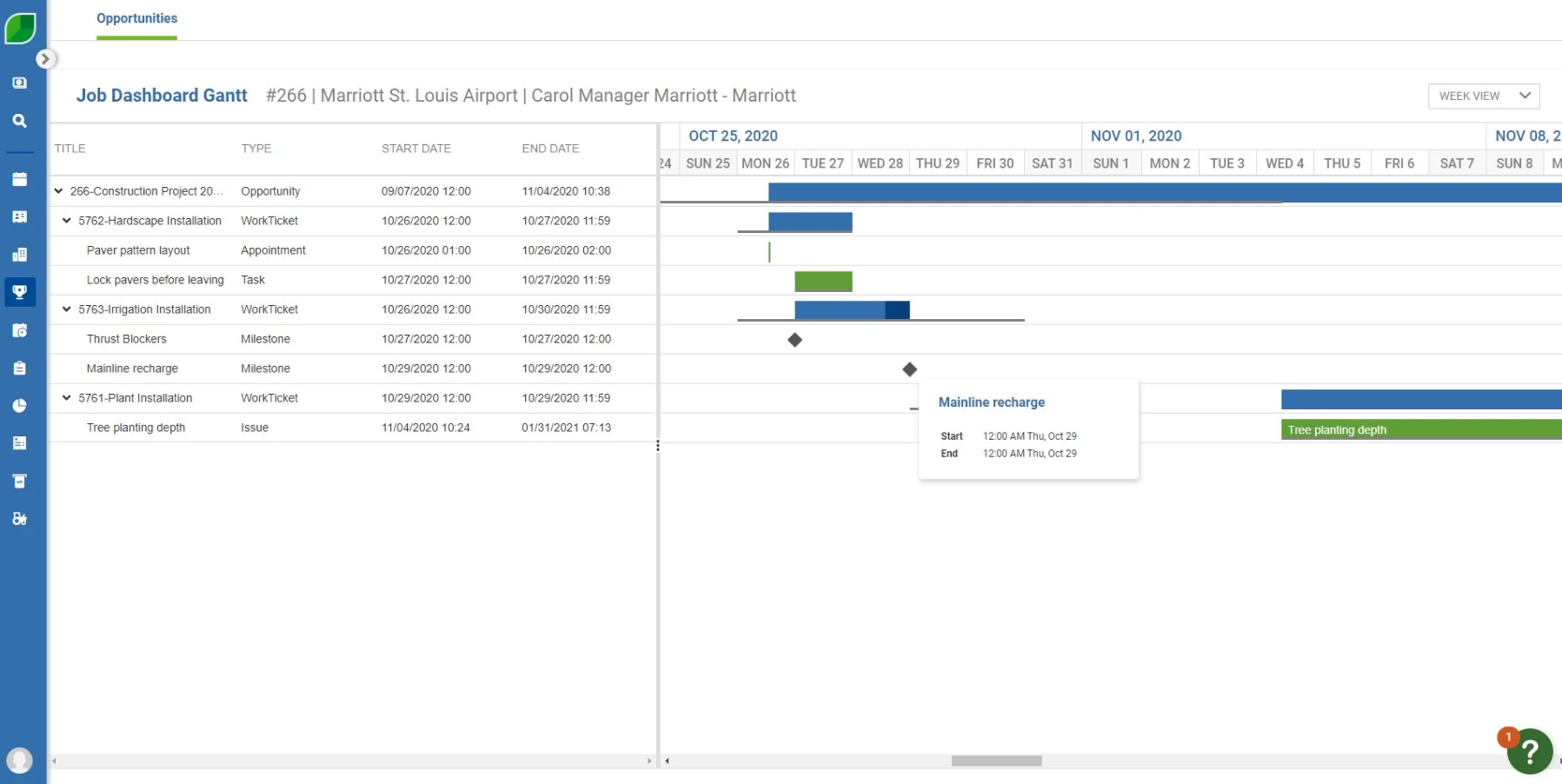
Landscape estimating: Aspire uses your preset profit margins and historical job data to create professional, accurate estimates in just a few clicks. This means you don’t need to crunch the numbers and risk missing important items manually.
Landscape scheduling: Once your client approves their estimate, you can add the projects to your live schedule with Aspire’s drag-and-drop calendar tools.
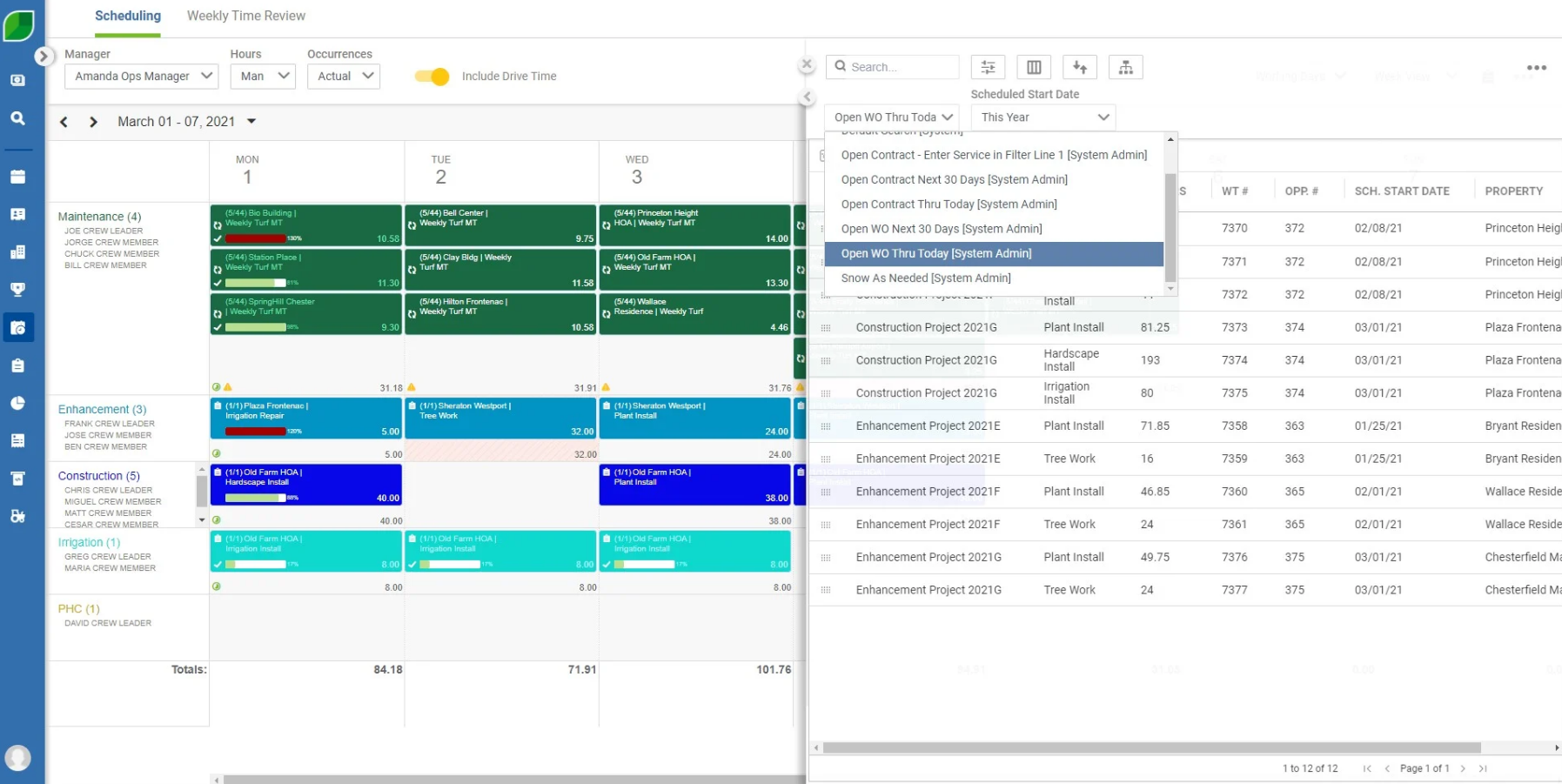
Landscape job costing: Aspire’s automated cost tracking lets users understand their actual job costs, including labor, materials, supplies, and other direct expenses. This visibility allows you to fine-tune your proposals and ensure profitable pricing.
Over to You!
Creating a professional, detailed, and user-friendly client application form is a good way to streamline your onboarding process. It helps reduce unnecessary back-and-forth and contributes to strong client relationships through a good customer experience.
Whether you opt for paper or digital new-client forms, it’s vital to collect the correct information in an organized format, such as the categories discussed in this article.
Want to take your client intake to the next level? Book a demo with Aspire today and see how it simplifies every step of your landscaping operations workflow.




 866-727-7473
 Schedule Demo
 390 S Woods Mill Rd #300 Chesterfield, MO 63017


