
Table of Contents
Snow removal tracking apps are field service management tools that help manage operations during the winter season. They enable you to track crews, equipment, job progress, and schedule projects to ensure timely snow removal for clients.
Users might look for snow removal tracking software because they struggle with:
Poor visibility into field operations
Inefficient manual tracking
Lack of proof of service when billing clients
Liability protection
To choose the best snow removal tracking app, consider features like scheduling, tracking, route optimization, and invoicing.
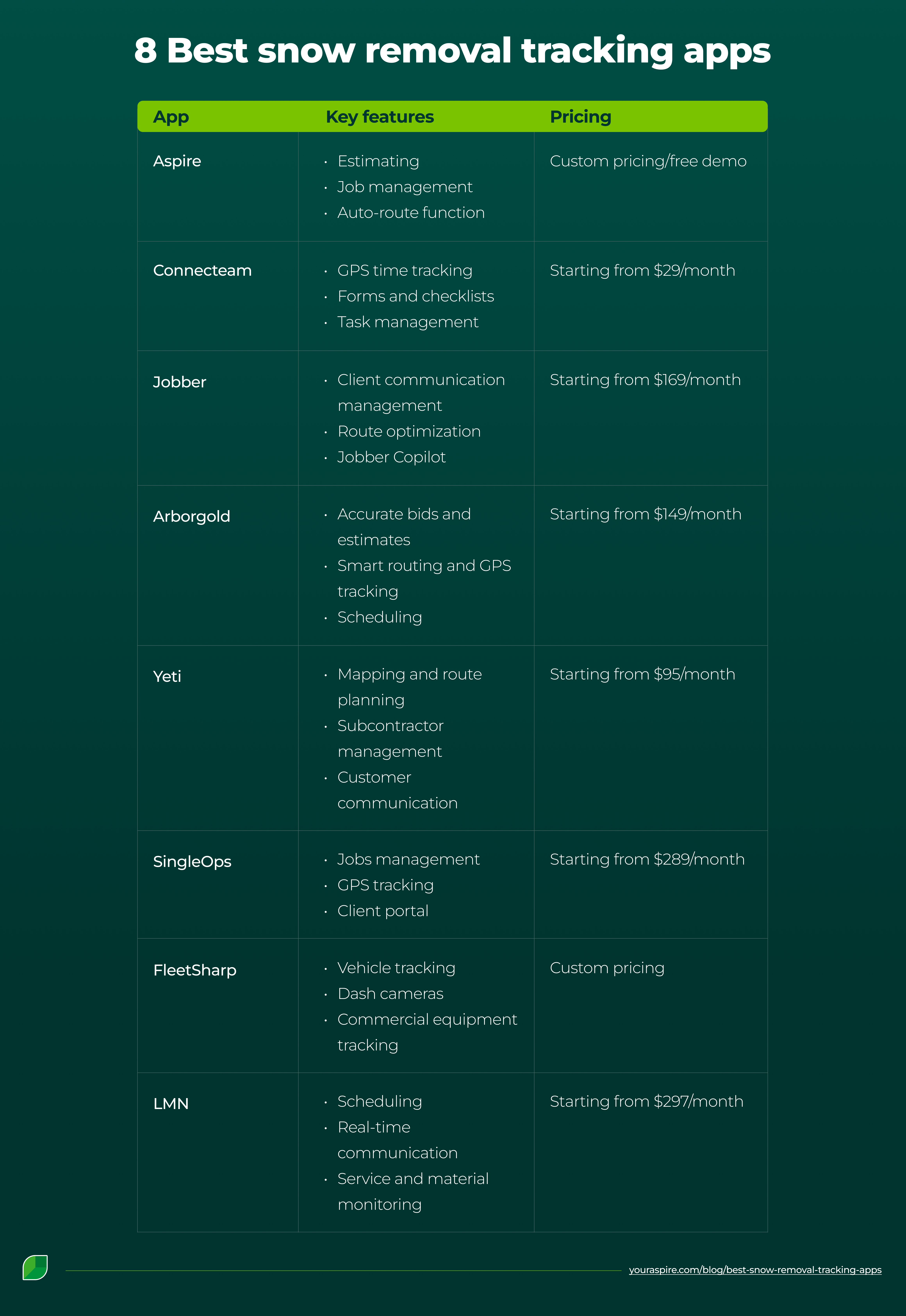
Eight of the best snow removal tracking apps, alongside their key features and pricing, are listed in the table below:
1. Aspire
Aspire is a field management app that enables snow removal businesses to centralize and optimize every aspect of their operations.
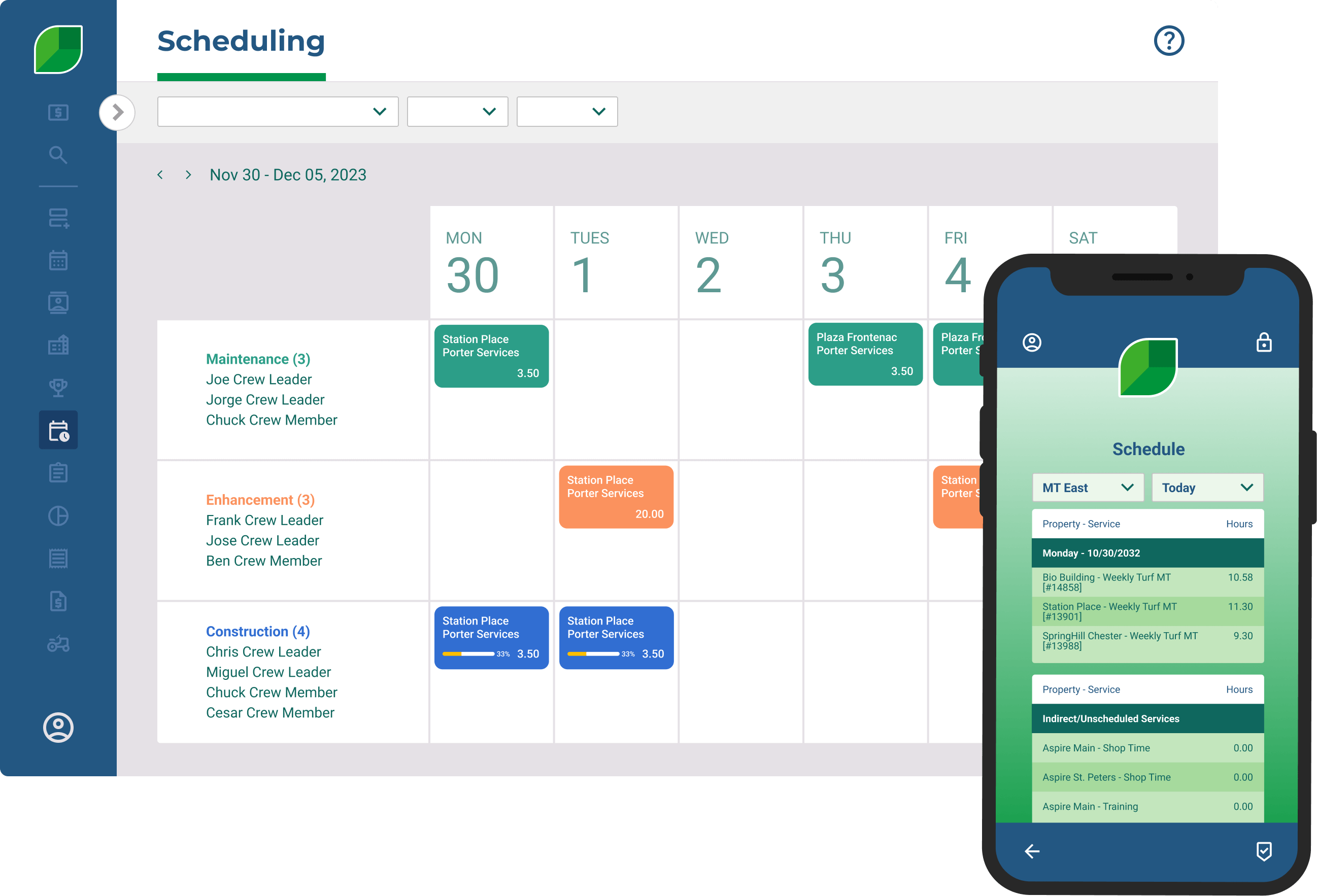
Source: Aspire
Aspire helps create quotes, schedule jobs, send texts to clients, process payments, and track project progress. Its user-friendly interface lets users run their snow removal operations from anywhere, on an iPad or a PC.
Key features:
Estimating: Create ready-to-send estimates in the field or the office using customizable templates.
Job management: Monitor snow removal projects' real-time progress with Aspire’s reporting feature. You can see the most productive crews and the revenue generated from each job.
Invoicing: Send invoices to clients and receive payments directly on Aspire. View outstanding invoices and follow up to recover owed revenue.
Scheduling and dispatching: Easily plan projects by dragging and dropping them on a calendar within Aspire. You can assign jobs to crews and reschedule them in just a few clicks.
Auto-route function: Automatically optimize your crews’ driving routes and view expected travel time between jobs.
Third-party integrations: Aspire features multiple integration apps for different functions. For instance, there is Integrated Payroll Services for payroll processing and Telematics for GPS and dashcam to improve driver accountability.
Pricing:
Aspire’s pricing plans depend on the size and complexity of your company:
The Growth plan is for businesses with a three- to five-million-dollar revenue stream.
The Corporate tier is for revenue streams of five to 13 million dollars.
The Enterprise plan is for revenue streams over $13M.
Contact the sales team to learn more about the cost of each plan. However, you can book a demo to see Aspire in action in real time.
Integrations:
Here are some of Aspire’s integrations:
Clover Connect: Credit card payment and ACH bank transfers.
Telematics: GPS and dashcam to improve driver accountability.
Marketing Pro: Targeted email and direct mail marketing campaigns.
SiteOne: Quickly create quotes to send to clients.
PropertyIntel: Digital takeoffs and property measurements.
Pros:
See what business owners who use Aspire have said about the tool on Capterra:
Detailed financial reporting: Aspire enables business owners to monitor their finances in real time, rather than waiting until the end of the month.
Intuitive and easy to use: Users have found Aspire quite easy to navigate.
Consistent customer support: Aspire provides a seamless onboarding experience for new users and ongoing support to ensure a smooth transition.
Cons:
Users haven’t just been raving about Aspire; they’ve had a few not-so-great experiences, too:
High learning curve: Some people have noted that learning to use Aspire takes time. Users may need to invest in a resident expert to take advantage of all this tool has to offer.
Occasional glitches: Occasional glitches can make Aspire difficult to work with. It sometimes results in a considerable lag in users’ workflow.
Best for:
Business owners: Use Aspire to manage and oversee snow removal contracts, plan crew schedules, and streamline operations.
Crew leaders: Receive and manage work orders, track crew hours, and report incidents.
Operations/account managers: Prepare snow removal estimates, ensure accurate bidding, and maintain client relationships.
2. Connecteam
Connecteam is an employee management app that empowers your field crew to deliver reliable services.
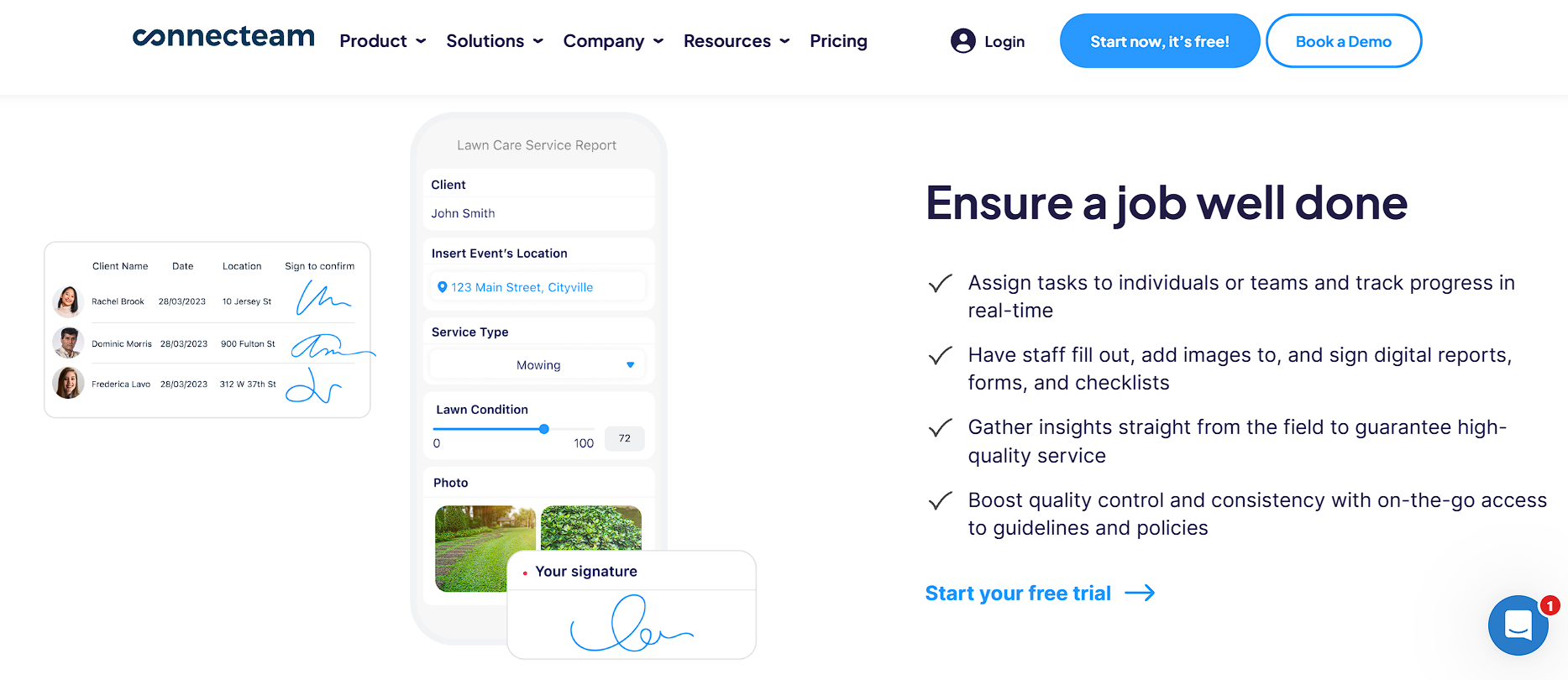
Source: Connecteam
Connecteam helps you create a digital workflow to keep the snow removal crews connected and aligned.
Key features:
GPS time tracking: Ensure your crew is at the right place at the right time.
Forms and checklists: Outline specific tasks to be completed at each site to prevent errors or missed steps. Get insights into what happens in the field, as crews can document their work properly using forms.
Task management: Assign tasks to the right crew, provide work order details, and track real-time progress.
Scheduling: Plan projects as they come, oversee crew availability, and ensure an efficient work sequence.
Pricing:
Connecteam has a free plan for businesses managing up to 10 employees.
Got more than that? You can choose between the following plans based on your needs:
Base plan at $29 per month.
Advanced plan at $49 per month.
Expert plan at $99 per month.
Enterprise tier: customized pricing for your business
Each plan includes a 14-day free trial to help you discover how Connecteam benefits your business.
Integrations:
Connecteam can be integrated with several third-party apps, such as:
Intuit QuickBooks for simplified accounting.
Lightspeed to predict labor percentages on your jobs.
Gusto to manage, hire, and pay employees from a single platform.
Pros:
Here’s what users like about Connecteam, according to G2:
Simple setup: Users found Connecteam easy to use for both management and employees.
Automated time tracking: Easy clock-in/out for employees and real-time monitoring.
Centralized operations: Connecteam keeps team communication and time management in a single location.
Cons:
Here’s what Connecteam users don’t like about the tool:
Excessive notifications: The overwhelming number of push notifications employees receive in the field can be frustrating.
Limited shift swap visibility on the web: Shift switches are not easily accessible on the web dashboard, unlike on the mobile app.
Extra charges for basic tools: Users complain that certain basic features that should be free are charged for.
Best for:
Operations manager: Oversee team activity, track employee job hours, and review field reports.
Scheduler: Create and update job schedules, manage availability, shift swaps, and reassignments.
Crew member: Clock in and out with GPS stamps, access job site details, and upload progress photos.
3. Jobber
Jobber is a business software tool that helps snow removal companies optimize their operations.
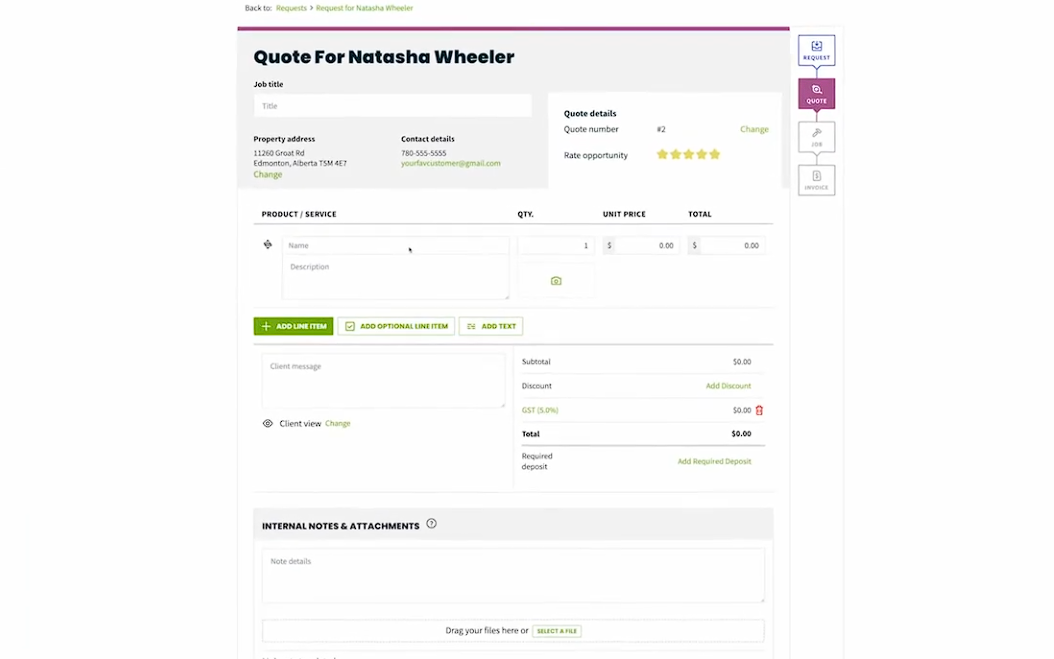
Source: Jobber
It can be used to attract clients, send quotes, book jobs, schedule projects, keep workers organized, track progress, and get paid.
Key features:
Client communication management: Keep customers updated on progress, crew travel times, and outstanding payments via text or email.
Route optimization: Optimize snow removal routes to reduce travel time and increase productivity throughout the day.
Scheduling: Schedule snow removal projects and assign tasks to crews more efficiently.
Jobber Copilot: Leverage AI to tackle business challenges, e.g., for data analysis, and provide excellent customer service.
Pricing:
Jobber has three pricing plans with a 14-day free trial available:
Connect at $169 per month for up to five users.
Grow at $349 per month for up to ten users.
Plus plan at $599 per month for up to 15 users.
Integrations:
Jobber integrates with several tools that help you be more productive:
Angi Leads to help people discover your snow removal business faster.
One Step GPS to keep track of where field techs and vehicles are in real time.
ResponsiBid for creating beautiful quotes for clients.
Protiv to create a worker incentive program to boost morale.
Pros:
Here’s what users like about Jobber:
Visual progress: Users can monitor project progress with real-time photos.
Simplifies business organization: Jobber makes it easy for businesses to manage operations and repetitive administrative tasks, allowing them to focus on providing exemplary client service.
Effectively handles business scaling: The software grows with your business, making it easy to add new clients, employees, and contractors to your account.
Cons:
And here’s what users are not excited about regarding Jobber:
Difficult-to-navigate app: The mobile app is more challenging to navigate than the web version.
Client-first approach: Users prefer an address-first approach when dispatching service, as clients can change, but properties don’t.
Limited functionality for solo users: Solo business owners report that certain features that would make their operations easier, such as booking confirmation, aren’t available. This can make it challenging to maintain a high level of professionalism.
Best for:
Business owners: Create and track snow removal contracts, review profitability, and manage client relationships.
Office administrator/project manager: Schedule jobs, update clients, send invoices, and respond to inquiries.
Sales reps: Send estimates, get client approval, track lead status, and follow up on expiring contracts.
4. Arborgold
Arborgold is a job management and scheduling software for snow removal businesses.
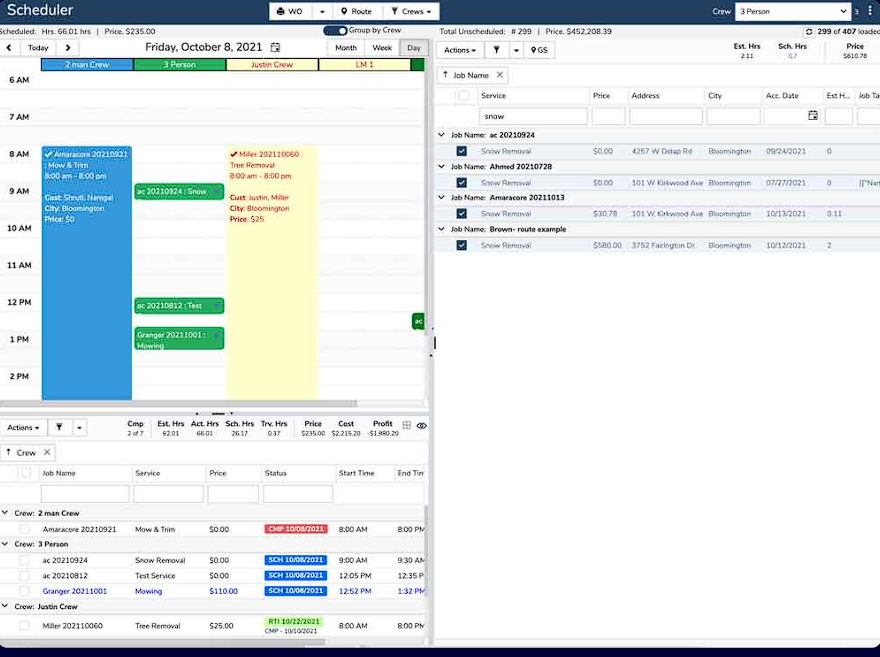
Source: Arborgold
It allows users to accept client service requests, assign crew jobs, share updates, and manage operations.
Key features:
Accurate bids and estimates: Create estimates based on the property’s square footage and automatically calculate pricing with fully-integrated cost calculators.
Smart routing and GPS tracking: Monitor crews' locations in real time and reduce travel time.
Scheduling: Simplify the scheduling process and assign tasks based on available workers and equipment capacity.
CRM: Access client contact and history from anywhere, making staying in touch and building lasting relationships easy.
Pricing:
Arborgold has three plans:
Starter: $149 per month.
Professional: $343 per month.
Enterprise: $573 per month.
Integrations:
Arborgold connects with several apps to automate your workflow:
SendGrid automates email marketing campaigns for your business.
Twilio lets you communicate with clients via text and voice.
SiteOne helps you estimate materials and create purchase orders.
QuickBooks manages payments and keeps everything centralized to ensure you’re always tax-ready.
Pros:
Take a look at some positive feedback from Arborgold users:
Simplifies administrative tasks: Arborgold offers several features that make daily administrative tasks easier to manage.
Easy to create proposals: Users like the ease of creating proposals and sending invoices on Arborgold.
Dedicated tool: It has a dedicated application for snow removal businesses.
Cons:
Users have also experienced some drawbacks with Arborgold:
Limited automation features: Users can’t send reminders about upcoming appointments or outstanding invoices.
Frustrating updates: Significant regular updates mean users have to relearn how to use the tool each time, which can be burdensome.
Learning curve: Because of its many features, navigation can be difficult at times.
Best for:
Operations manager: Monitor snow removal operations, send quotes, review profitability, and manage client relationships.
Crew leader: Track the team’s assignments and progress and report issues.
5. Yeti
Yeti is an all-in-one snow management software solution with a toolkit to protect your business and maximize profitability.
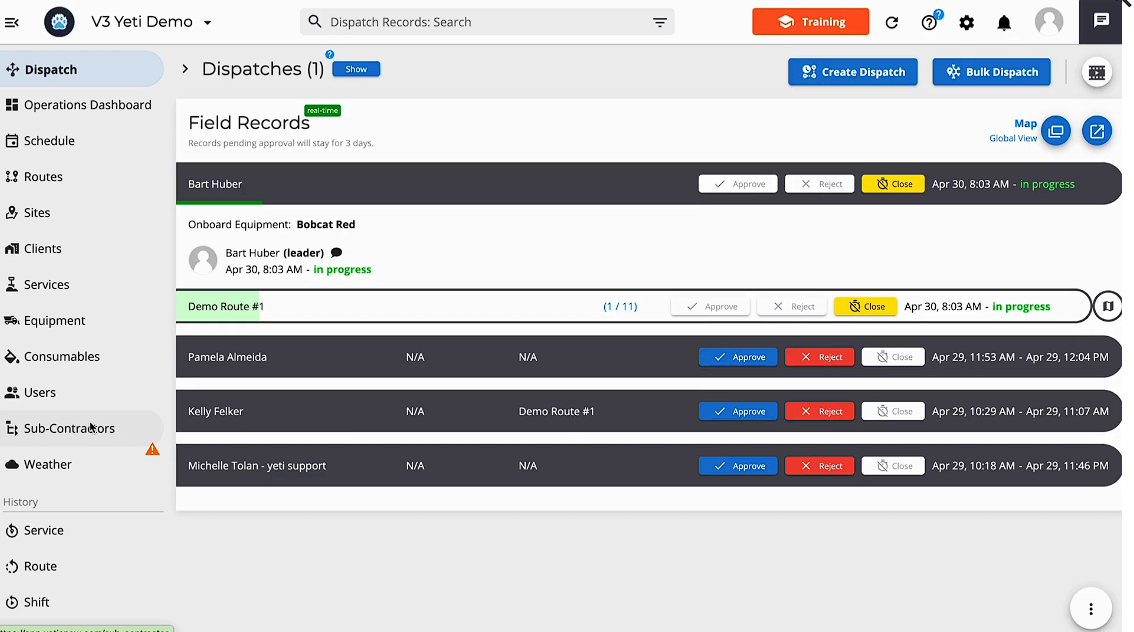
Source: Yeti
Users can monitor crews, manage contractors, and handle client billing to ensure a streamlined workflow on Yeti.
Key features:
Compliance tracking and documentation: This ensures that every job meets the company’s standards and provides documentation covering everything that happens on the job site.
Mapping and route planning: Optimize your service routes, reduce travel time, and track crews to ensure profitability.
Subcontractor management: Provide subcontractors with the tools they need to work and monitor their operations.
Customer communication: Keep clients in the loop and store client service records.
Pricing:
Yeti offers a free plan for businesses managing up to ten sites. If you have more than that, there’s a High Performance plan that starts at $95/mo.
Integrations:
Yeti offers the following integrations:
Zapier helps you connect Yeti with over 6,000 apps.
Xero lets you sync financial records and keep accounting records clean.
Salesforce provides visibility into operations and client relationships.
QuickBooks makes invoicing, payroll, and bookkeeping error-free and straightforward.
Pros:
Here are some advantages of Yeti:
Keeps detailed records: Yeti lets users store project data with photos, enabling them to create reports and track jobs.
Protects snow removal business: This tool keeps you safe with GPS-verified records, time-stamped photos, and legal forms.
Easy to use: Yeti is easy to set up and use.
Cons:
In the same vein, Yeti also has some disadvantages:
No job management feature: It’s difficult to get a detailed overview of your snow removal business operations.
Expensive plans: As jobs increase, Yeti’s High Performance plan can get really expensive, really fast.
Best for:
Solo snow removal business owners: Enables them to manage, protect, and grow their business on their own.
Crew leaders: Manage team assignments, monitor progress, and ensure compliance.
Field techs: View quality checklists, photo capture for proof of service, and share updates.
6. SingleOps
SingleOps is a business software platform that can help you automate your snow removal operations.
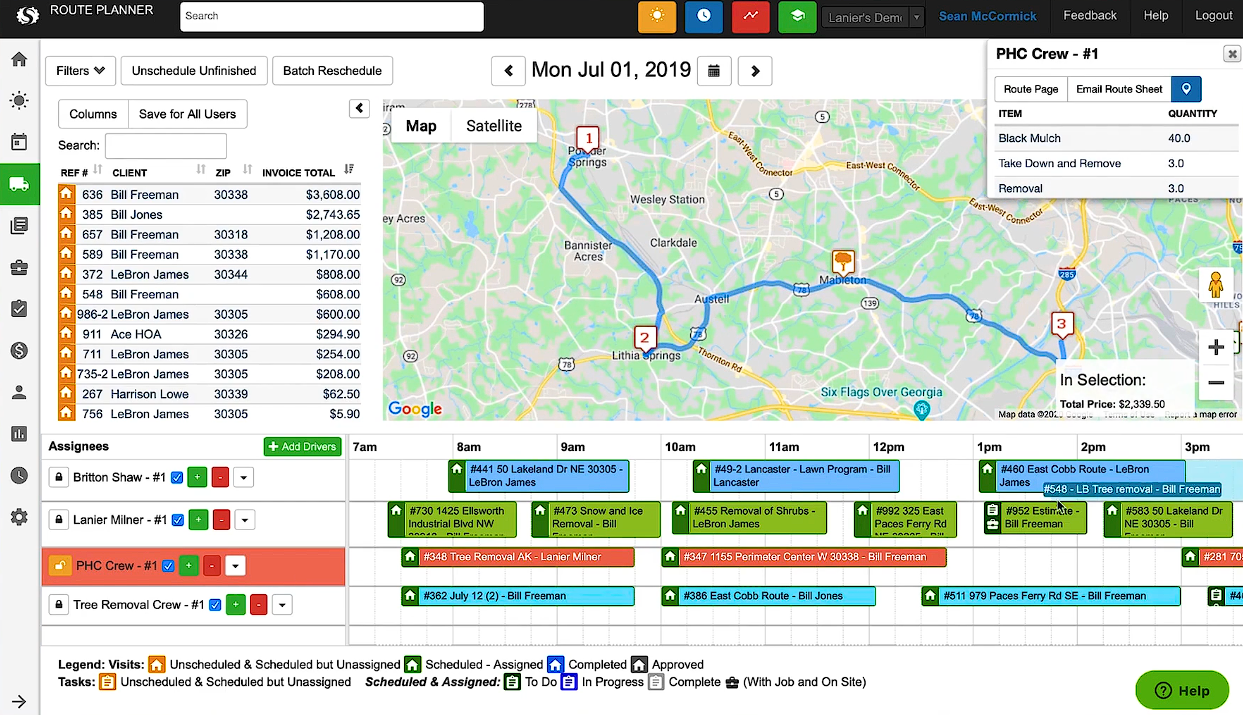
Source: SingleOps
It lets you build estimates for clients, automate work order creation, schedule daily activities, and send invoices automatically.
Key features:
Jobs management: Create estimates, send proposals, get the most efficient routes to each job, and customize work orders.
GPS tracking: Monitor the location of your vehicles, equipment, and crews in real time.
CRM: Manage client and prospect data and nurture leads into customers with SingleOps’ CRM.
Client portal: Improve customers’ experience with your business. Allow them to book services, view and approve proposals, and make payments directly on the platform.
Pricing:
SingleOps has three plans:
Essential, starting at $220/mo for single-crew businesses.
Plus, starting at $385/mo for one-plus-crew businesses.
Premier, starting at $550/mo for multiple crew businesses.
Integrations:
QuickBooks helps streamline financial tasks like automated invoicing, payment tracking, and cost management.
Google Calendar allows all confirmed appointments to be accessible in Google via any smart device.
Pros:
Existing users have had good things to say about SingleOps:
Intuitive and easy to use: It’s easy to navigate the app, find what you need, and make changes to company files.
Comprehensive onboarding process: Users are paired with a client success rep who ensures they know everything needed to use the tool.
Customizable platform: SingleOps allows users to modify the software to suit their current needs.
Cons:
However, not everyone has enjoyed using the tool. Here’s what users don’t like about SingleOps:
Poor data migration: Users who switched tools didn’t like the process.
Learning curve: Some said SingleOps is complex and there’s a lot to learn.
Best for:
Business owners: For complete control over their snow removal operations.
Schedule/operations managers: Streamline workflows and improve team efficiency.
Sales team: Identify upsell opportunities and drive lead conversions.
7. FleetSharp
FleetSharp is a fleet-tracking and management solution that helps you monitor your assets in real time.
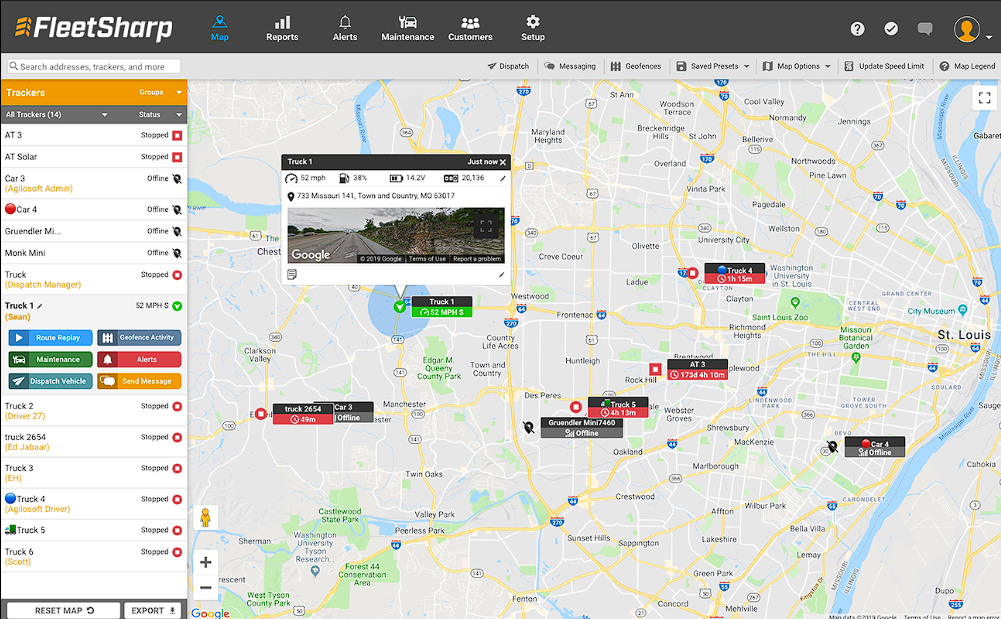
Source: FleetSharp
It allows you to track vehicle location so you can assign the nearest crew to a job, improving client experience and satisfaction.
Key features:
Vehicle tracking: Keep tabs on vehicle location, driver behavior, vehicle’s history, and manage maintenance.
Dash cameras: Stay visually updated with drivers for accountability, to reduce risk and liability, ensure proof of service, and provide accurate billing.
Commercial equipment tracking: Provides round-the-clock monitoring of snow removal equipment and tracks service activity to extend the tools’ lifespan.
Tool tracking tags: Attach tags to tools or vehicles to prevent them from being misplaced or stolen. The tags let you see their current and last-known locations.
Pricing:
FleetSharp offers custom pricing that’s only available on demand.
Integrations:
FleetSharp is integrated with field service management tools, business software, and more:
Aspire offers end-to-end functionality for snow removal businesses, providing complete visibility into their operations.
The Grow Group provides personalized consulting to help business owners succeed.
Service Autopilot automates operations for snow removal companies.
Pros:
Here are some of the upsides of FleetSharp:
Better fleet visibility for smarter decisions: FleetSharp’s real-time tracking lets you see exactly where your vehicles and equipment are, helping you manage resources more effectively.
Safer operations with driver oversight: Monitoring driving behavior helps you spot risks early, coach unsafe habits, and have solid documentation if an accident occurs.
Faster response times for happier clients: FleetSharp’s users can swiftly identify crew locations and dispatch them to jobs based on proximity to the site.
Cons:
There are also downsides to FleetSharp:
Limited functionality: FleetSharp only provides insights into asset location. Features such as client management and scheduling aren’t available.
Complex user interface: Some users find the tool difficult to navigate.
Best for:
Operations managers: Track the exact location of the equipment and assets to schedule projects efficiently.
Business owners: Keep track of assets and maintenance, and ensure consistent, high-quality service delivery.
8. LMN
LMN is a job management software program that improves communication between field and office staff.
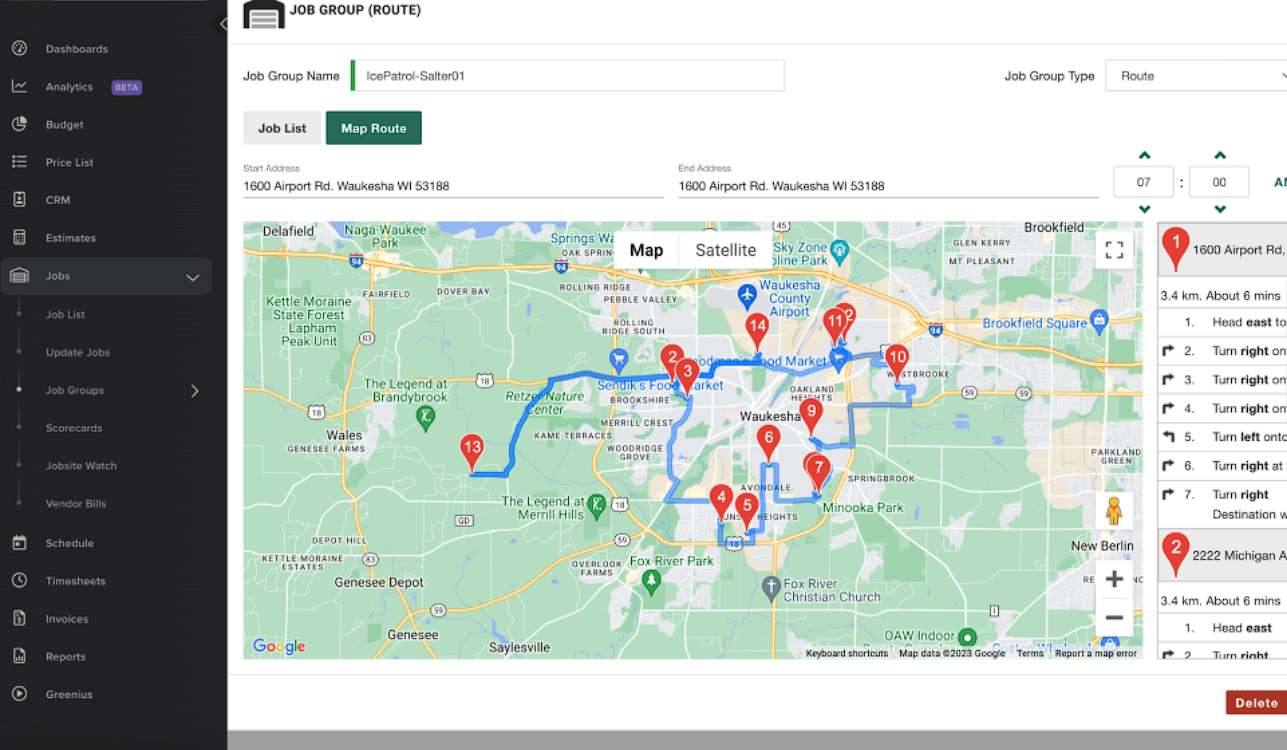
Source: LMN
It gives your crew the tools they need to manage their day, easily track time, and schedule tasks.
Key features:
Scheduling: Assign jobs to your crew and optimize routes to reduce drive time and improve productivity.
Real-time communication: Maintain three-way communication with clients, field crews, and office staff.
Service and material monitoring: Keep track of the materials your team needs for snow removal to ensure they can provide quality service.
GPS-enabled maps: Confirm where your field crew is and when they arrived to verify billable hours and ensure accurate payroll.
Pricing:
LMN has three pricing tiers based on the size of your business and the number of employees you manage:
Starter starts at $297/mo for growing companies with one to three crew members.
Professional starts at $598/mo for companies with ten to 15 employees.
Enterprise: Available on demand for business in multiple locations.
Integrations:
QuickBooks automates data entry and simplifies payroll management.
Zapier lets you connect LMN with your existing tech stack.
LMN Pay makes it easy to receive client payments.
Pros:
Below are some of the benefits of using LMN, as seen on GetApp:
Crew productivity boost: Users report that LMN’s features, such as scheduling, time tracking, and estimating, help their snow-removal crews work more efficiently.
Smarter decisions with data-driven insights: With access to project data, costs, and employee performance, you can identify issues early and improve profitability.
Ongoing support: LMN provides onboarding and training to help users quickly master the tool.
Cons:
Here are the drawbacks you might experience when using LMN:
CRM lacks marketing features: It doesn’t include tools for marketing the business. So, no automated email campaigns, no ability to track leads from website forms, and no newsletter management.
Learning curve: It takes a while to master using the tool to manage snow operations.
Best for:
Business owners: Empower your team to be more effective.
Dispatcher/supervisor: Track time, payroll, monitor employees, and keep everyone in the loop.
Crew leads: Upload photos, notes, and materials, and keep stakeholders updated on project progress.
What are the best snow removal tracking apps for iPhone?
The best snow removal business apps for iOS are listed below:
Aspire: Aspire Mobile is a field service management app for iPhone and iPad. It fully integrates with the Aspire management system and allows your team to clock in/out, access daily schedules, and log hours.
Management staff can track crew locations, update clients via text or email, and send invoices. Aspire also allows teams to remain productive in poor network areas and syncs data once the internet is reconnected.
Yeti Snow Operator: This app lets you monitor crews, optimize routes, and automate billing. The field team can keep the office team updated in real time by sending site photos, notes, and maps.
Workiz: Workiz enables you to track business on the go. You can stay fully aligned with the team, manage communications between clients and techs, review daily jobs, and oversee administrative duties wherever you are.
What are the best snow removal tracking apps for Android?
The best snow removal business apps for Android are listed below:
Aspire: Aspire’s Android app features essential tools such as time-tracking, geotagging, communication, and offline access to streamline workflows for field crews and improve job-cost accuracy. It allows you to manage operations from anywhere.
Connecteam: An ideal app for managing your team remotely. It lets you track hours accurately and create and share schedules. With Connecteam, you can train and manage snow removal crews from a mobile device. It also has a checklist feature to guide employees on what to do at each site.
BusyBusy: This is a time-tracking app your team can use. It allows the field crew to take project photos so you can track progress. You can also monitor their location in real time and gain insights into daily operations, enabling you to make informed decisions quickly.
How to choose the best snow removal tracking app for your needs
To choose the best snow removal tracking app for your needs, here’s what to do:
Define user type: Decide who will use the app the most. Is it a solo contractor, small business owner, or large operations manager?
Identify features needed: Make a list of the features your snow removal business needs to run smoothly or scale up. Here are some ideas: GPS tracking, route optimization, client notification, invoicing and payments, integrations with third-party apps, offline access, or photo documentation.
Consider ease of use: Assess the app's intuitiveness for office and field crews with little tech experience. How long will it take to train them? Does the tool have an onboarding process? Is it available on iOS and Android?
Evaluate available support: Check online reviews and community forums to note the app team’s response time to issues. Are there reports of regular bug fixes and updates? Do they have reliable support to handle emergencies, especially during peak snow seasons?
Pricing: Confirm that the tool’s pricing is within your budget. Whether you’re a solopreneur or an established business, ensure the app you choose fits your budget.
Free trial or demo option: It’s always a good idea to test the tool before committing. Check that this option exists so you can see how the software performs under pressure.
Over to you!
The best snow removal app should help you streamline operations, find and nurture leads, and grow your business.
One tool that fits the profile is Aspire. It provides contractors, business owners, crew members, and clients with the tools to stay productive and maintain communication.
You won’t have to shuffle between apps to get things done. Plus, it eliminates the need for paperwork in handling operations.
Book a live demo today to get a detailed overview of how Aspire works.












 866-727-7473
 Schedule Demo
 390 S Woods Mill Rd #300 Chesterfield, MO 63017


